

Quick answer: Better lecture notes are not a transcript. They are a structured record of the ideas you need to understand, the examples that explain them, the questions you still have, and the relationships you will need to recall later. A practical system has three phases: preview before class, capture selectively during class, and review soon after class. Use one consistent page structure, mark uncertainty instead of freezing when you miss a point, and turn your notes into questions, summaries, diagrams, or practice prompts within 24 hours. The goal is not beautiful pages. The goal is notes you can actually use to explain, solve, compare, apply, and retrieve the course material.
 Effective note-taking starts with active listening and selective recording rather than trying to copy every sentence. Image: Ulrich Wechselberger, Wikimedia Commons, CC0 1.0.
Lecture note-taking looks simple from a distance: listen, write, and study later. In practice, students face a harder problem. A lecturer may move quickly, jump between slides and explanation, define one term while connecting it to three earlier ideas, show a diagram, solve a problem, answer a question, and mention what will matter on an exam—all within a few minutes. If you try to write everything, you stop listening. If you write too little, you may leave with a page of disconnected keywords that makes no sense two days later.
The most useful note-taking systems solve a decision problem. They help you decide what deserves to be captured, how to mark structure while information is arriving, what to do when you fall behind, and how to turn raw notes into something that supports learning. Cornell University’s Learning Strategies Center emphasizes that notes should be usable, not merely complete, while Oregon State University’s Academic Success Center similarly frames note-taking as a process of capturing main ideas in your own words so they can later be reviewed and revised.
This guide is designed for live lectures, recorded lectures, seminars, online classes, and technical courses. It also explains when Cornell notes are useful, when an outline or problem-solving format is better, how to combine slides with handwritten or typed notes, how to recover from messy pages, and how to convert lecture notes into study material without rewriting the entire course.
1. Decide What Your Notes Need to Help You Do
Do not begin by choosing a notebook app or deciding whether to use blue or black ink. Begin with the task the notes must support.
In one course, you may need to remember definitions and explain theories. In another, you may need to solve equations. A history lecture may require chronology, causes, evidence, and competing interpretations. A biology lecture may require processes, diagrams, vocabulary, and exceptions. A law lecture may revolve around rules, cases, distinctions, and applications. A literature lecture may emphasize arguments, quotations, themes, and interpretive questions.
Write one sentence for each course:
- “My notes need to help me explain concepts in my own words.”
- “My notes need to help me solve problem types without copying the example.”
- “My notes need to show how theories differ and what evidence supports each one.”
- “My notes need to capture the instructor’s interpretation, not only the slide text.”
Why this matters: A note-taking method is useful only when it matches the learning task. Cornell notes are excellent for concepts that can be converted into questions and answers. A problem-solving course may need worked examples with annotated steps. A diagram-heavy course may benefit from wide pages, digital annotation, or a tablet. Your method should follow the material.
2. Preview the Lecture Before It Starts
Good notes often begin five minutes before class.
Preview the lecture title, learning objectives, assigned headings, slides, or previous lecture summary. You are not trying to learn everything in advance. You are giving your brain a framework so new information has somewhere to go.
Oregon State University recommends preparing for note-taking by completing assigned reading, reviewing slides when available, or creating a skeleton outline before the lecture. Cornell’s Learning Strategies Center similarly recommends previewing material and reviewing the previous lecture so you can enter class with context.
A five-minute preview can include:
- Read the lecture title and objectives.
- Scan slide headings or textbook section headings.
- Write three terms you expect to hear.
- Review the previous lecture’s one-paragraph summary.
- Write one question you hope the lecture answers.
Example: Suppose today’s lecture is “Market Structures.” Before class, you write: perfect competition, monopoly, barriers to entry, pricing power. Now when the instructor says, “The key distinction is not the number of firms alone but how much control each firm has over price,” you immediately recognize it as a central relationship rather than another sentence to transcribe.
3. Prepare a Page Structure Before the Instructor Starts
The first minute of class is a bad time to decide where the date, title, diagrams, questions, and examples will go.
Create a consistent page header containing:
- course name or code;
- date;
- lecture number or week;
- lecture title;
- page number if your notes span multiple pages.
Then choose a page structure. Three useful options are:
Option A: Cornell layout
Divide the page into a large note area, a smaller cue/question column, and a summary area at the bottom. During class, use the main note area. Soon afterward, add cue questions and a short summary.
Option B: Outline layout
Use headings, subheadings, indentation, and bullets to show hierarchy. This works well when the lecture has a clear sequence of topics and subtopics.
Option C: Split content-and-questions layout
Use the left two-thirds for notes and the right third for questions, examples, confusions, connections, or exam hints. This is useful when you want something looser than Cornell notes.
The best structure is the one you can use fast enough during a real lecture.
4. Listen for Structure Before You Listen for Detail
Lecturers constantly signal structure, sometimes more clearly in speech than on slides.
Listen for phrases such as:
- “There are three reasons…”
- “The most important distinction is…”
- “Compare this with…”
- “This follows from…”
- “The exception is…”
- “For the exam, you should be able to…”
- “The key point is…”
- “In summary…”
UNSW’s Guide to Lectures specifically recommends listening for verbal signposts because lecturers often indicate important material by repetition, tone, slower delivery, or explicit phrases that announce main ideas.
When you hear a structural cue, record the relationship, not just the words.
Weak note:
“Inflation, interest rates, borrowing.”
Stronger note:
“Higher interest rates → borrowing becomes more expensive → spending/investment may slow → can reduce inflationary pressure.”
The second version preserves meaning.
5. Write Ideas in Your Own Words When You Can
Note-taking should involve thinking, not only copying.
If the lecturer gives a definition that must be precise, you may need to capture it accurately. But for explanations, examples, and relationships, paraphrasing forces you to process meaning.
Oregon State advises students not to act like transcribers but to capture concepts and connections in their own words. UNSW gives the same practical recommendation: be selective, avoid transcribing the entire lecture, and write the main points using your own phrasing.
Try this test:
If your notes contain a sentence you could not explain without rereading it three times, you probably copied wording without fully processing it.
Alternative: If the lecture is moving too fast to paraphrase, capture a short phrase first and place a question mark next to it. Rewrite or clarify the idea immediately after class while your memory is fresh.
6. Distinguish Main Ideas From Supporting Details
A good page makes hierarchy visible.
Use a simple three-level structure:
- Main idea — major heading or boxed line.
- Support — definition, reason, mechanism, evidence, or step.
- Example — indented or marked “Ex:” so it does not look like a separate rule.
For example:
Operant conditioning
- Behavior changes through consequences.
- Reinforcement increases behavior.
- Punishment decreases behavior.
- Ex: giving a reward after desired behavior = positive reinforcement.
This structure is better than a flat list where “operant conditioning,” “reinforcement,” “reward,” and “punishment” all appear with equal visual weight.
7. Capture Examples Because They Reveal How the Instructor Thinks
Students often skip examples because they look less “official” than definitions. That can be a mistake.
Examples show how the lecturer applies a concept. They reveal which features matter, what counts as a valid application, where students commonly misunderstand a rule, and how an abstract idea may appear in an exam question.
Record examples selectively. You do not need every anecdote. Capture examples that:
- clarify a confusing concept;
- show a step-by-step process;
- contrast two similar ideas;
- illustrate an exception;
- appear to be emphasized by the instructor;
- show how a concept is used in practice.
Mark examples clearly with “Ex:” or a symbol so you do not confuse them with the rule itself.
8. Record Questions and Confusion in Real Time
Confusion is useful data.
When you do not understand a point, do not stop taking notes for five minutes while mentally replaying the last sentence. Mark the uncertainty and continue.
Use a symbol such as:
- ? = unclear;
- ?? = important confusion;
- F/U = follow up later;
- EXAM? = possible assessment relevance;
- LINK = connection to another topic.
Oregon State explicitly recommends marking areas of confusion and follow-up. This prevents a momentary gap from breaking your attention for the rest of the lecture.
After class, the question marks become a to-do list for office hours, textbook review, discussion sections, or peer study.
9. Use Abbreviations Strategically
Abbreviations reduce writing load, but too many can make notes unreadable.
Useful universal abbreviations include:
- w/ = with;
- w/o = without;
- b/c = because;
- vs. = versus;
- ex. = example;
- def. = definition;
- imp. = important;
- ↑ = increases;
- ↓ = decreases;
- → = leads to or causes;
- ≠ = not equal to / different from;
- ≈ = approximately.
You can also build course-specific abbreviations, such as “MR” for marginal revenue or “CN” for central nervous system.
Rule: If you cannot decode an abbreviation the next day, it is not saving time. Keep a short key at the front of your notebook during the first weeks of a course.
10. Leave Space When You Miss Something
Do not panic when the instructor moves on before you finish writing.
Leave a blank line, add a timestamp if the lecture is recorded, write a keyword that helps you locate the missing point, and continue listening.
UNSW recommends leaving a space when you miss information so you can fill it later. This is far more efficient than losing the next five minutes while trying to reconstruct one missed sentence.
If slides are available, mark “slide 14” or a similar reference. If the lecture is recorded, add “23:40?” and revisit that segment after class.
11. Do Not Copy Slides Word for Word
Slides are usually a framework, not the full lecture.
If the instructor already provides the bullet points, spend your attention on what is added verbally:
- explanations;
- examples;
- qualifications;
- exceptions;
- comparisons;
- connections to previous material;
- exam hints;
- answers to student questions.
UNSW specifically notes that slides often contain only an outline and that copying them is less useful than listening to what the lecturer adds.
If slides are provided beforehand, annotate them. Add a margin for questions and your own summaries. If the slides are dense, avoid trying to rewrite them on a blank page just to create the feeling of note-taking.
12. Use Cornell Notes When the Material Can Become Questions
The Cornell system is especially useful for concept-heavy courses because it separates raw notes from later retrieval prompts.
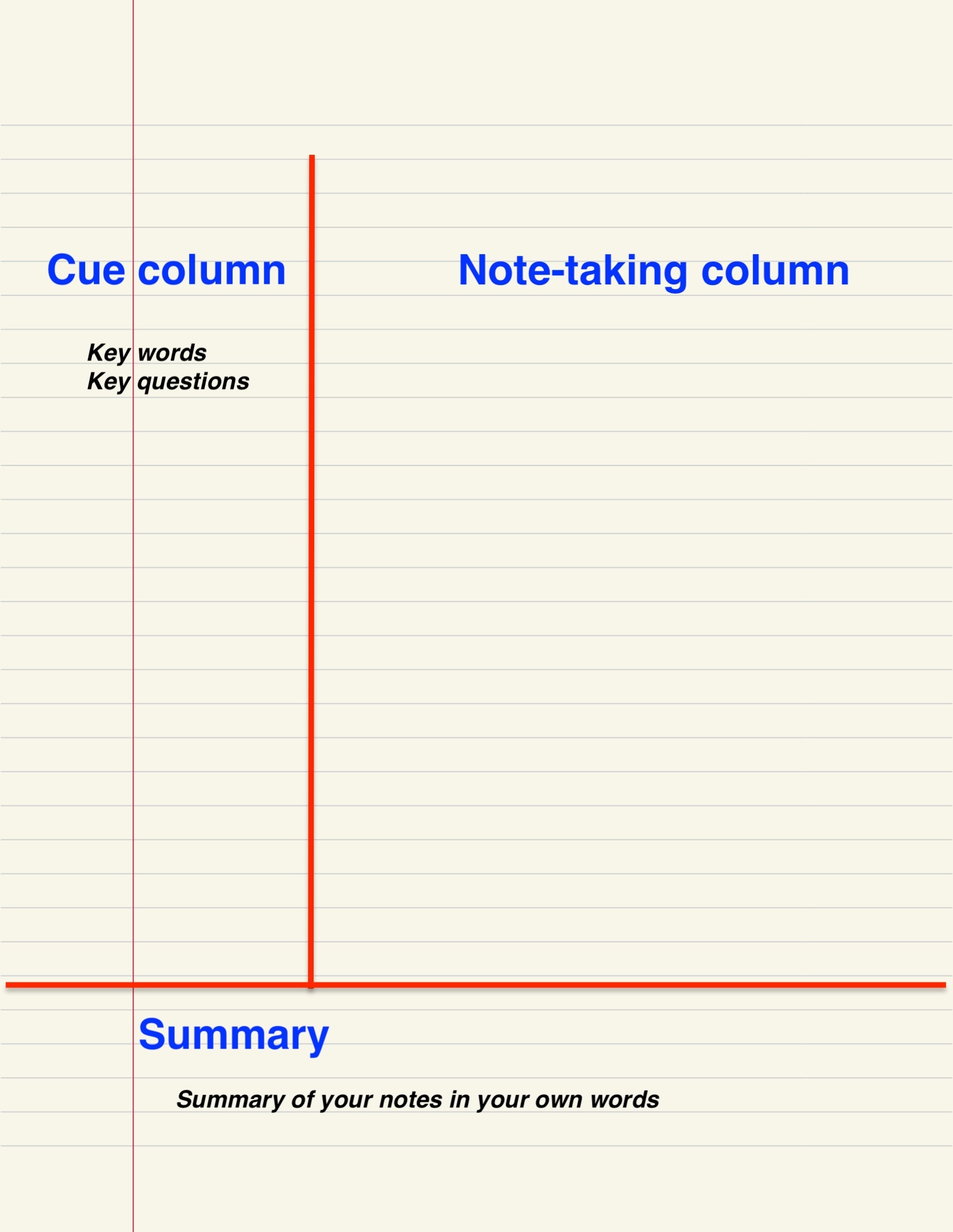 The Cornell system separates lecture notes from cue questions and a summary, making the page useful for later self-testing. Image: WikiLinuz, Wikimedia Commons, CC0 1.0.
Cornell’s Learning Strategies Center describes a five-part sequence: record notes, formulate questions, recite from the cues, reflect on meaning, and review regularly.
A practical version looks like this:
- During lecture: use the large note area.
- After lecture: write questions in the cue column.
- Bottom summary: explain the lecture in 3–5 sentences.
- Study: cover the note column and answer from the cue questions.
Example cue questions:
- What are the three assumptions of this model?
- Why does the reaction rate increase with temperature?
- How is negative reinforcement different from punishment?
- What evidence supports this interpretation?
This transforms a page from something you reread into something you can use for retrieval practice.
13. Use an Outline When the Lecture Has Clear Hierarchy
Outline notes work well when the instructor moves from broad categories to details.
Example:
I. Causes of World War I
- A. Alliance systems
- Triple Entente
- Triple Alliance
- B. Militarism
- arms race
- naval competition
- C. Nationalism
- Balkan tensions
The outline method makes relative importance visible, but it can fail when the lecture is nonlinear or highly diagrammatic.
If the lecturer jumps around: use rough headings during class, then reorganize only the most important relationships afterward. Do not spend the whole lecture moving bullets and indentation levels.
14. Use a Mapping Method for Highly Connected Concepts
Some topics are networks rather than lists.
A concept map can be useful when you need to show causes, categories, feedback loops, or multiple relationships. Put the central concept in the middle and draw labeled connections outward.
For example, “climate system” might connect to atmosphere, oceans, land, ice, and biosphere, with arrows showing energy or carbon flows.
Mapping is less useful when the course requires precise linear procedures, lengthy equations, or detailed quotations.
A hybrid approach often works best: take conventional notes during the lecture and create a concept map afterward to synthesize the relationships.
15. Use a Problem-Solving Format in Math, Physics, Chemistry, and Engineering
Technical notes should capture why steps happen, not just the finished calculation.
For each worked problem, record:
- problem type;
- given information;
- what must be found;
- relevant formula or principle;
- why that formula applies;
- each transformation or step;
- units;
- common error;
- how to check the result.
Do not copy equations without annotation.
Weak note:
v = u + at
Better note:
v = u + at — use for constant acceleration when initial velocity, acceleration, and time are known.
Add a “mistake trap” line such as: “Do not use if acceleration changes with time.” That note may become more valuable than the worked example itself.
16. Capture Diagrams as Relationships, Not Art Projects
A lecture diagram does not need to be beautiful. It needs to preserve meaning.
When copying a diagram, prioritize:
- labels;
- direction of arrows;
- relative order;
- inputs and outputs;
- boundaries;
- cause/effect relationships;
- the lecturer’s verbal explanation.
If the lecturer shows a detailed anatomical image, do not waste ten minutes trying to recreate every contour. Sketch the relevant structure, label the parts being discussed, and note the source slide or textbook figure for later review.
Use arrows and short annotations aggressively. A rough but accurately labeled diagram is more useful than a polished image with missing concepts.
17. Separate Definitions From Explanations
Definitions are compact. Explanations are relational.
For each major term, create two lines:
Definition: What the term means.
Why it matters: What the term does, changes, predicts, explains, or connects to.
Example:
Opportunity cost: value of the next-best alternative forgone.
Why it matters: helps compare choices using what is sacrificed, not only explicit money spent.
This prevents notes from becoming a glossary with no understanding.
18. Mark Instructor Emphasis Without Assuming It Guarantees an Exam Question
Lecturers often signal importance through repetition, tone, board work, or phrases such as “you should know this.” Capture those signals, but do not turn them into certainty.
Use a symbol like ★ for emphasis. Then later compare that material with:
- learning objectives;
- assignment topics;
- practice questions;
- previous exams if legitimately provided;
- the syllabus;
- review-session guidance.
One emphasized statement is evidence of importance, not a guarantee of assessment.
19. Record Administrative Information Separately
Assignments, due dates, changes in reading, office hours, and exam instructions do not belong buried in conceptual notes.
When the lecturer announces a deadline, mark it with a clear symbol such as “ADMIN:” and move it into your calendar or task system after class.
Example:
ADMIN: Lab report due Monday 5 p.m.; upload PDF to LMS.
If you leave that sentence on page 17 of your notebook and never transfer it, your notes have failed as a reminder system.
20. Choose Handwriting or Typing Based on the Course and Your Behavior
There is no need to treat this as an ideological contest.
Handwriting can encourage slower, more selective notes and may make drawing, equations, and spatial layouts easier. Typing is useful when the lecture is information-dense, when accessibility needs make handwriting difficult, when searchable text matters, or when you need to integrate links and digital materials.
The biggest practical danger of a laptop is often not the keyboard itself but the distraction environment around it.
If you type notes:
- close unrelated tabs;
- silence notifications;
- use full-screen mode;
- do not transcribe automatically just because you can type quickly;
- insert “Q:” and “EX:” markers as you go;
- review and summarize afterward.
If you handwrite:
- use enough page space;
- do not sacrifice comprehension for neatness;
- photograph or scan important pages if loss would be costly;
- keep diagrams legible enough to revisit.
21. Avoid the Transcription Trap
Fast typing can create the illusion of excellent notes.
A 2,000-word transcript may be less useful than a 600-word structured summary because the transcript does not identify what matters. You still have to interpret the lecture later.
If your notes look like subtitles, pause and ask:
- What is the lecturer actually arguing?
- Which three ideas organize this section?
- What examples are worth keeping?
- What changed from the previous concept?
Use headings and relationships to compress the lecture while it is happening.
22. Take Notes From Recorded Lectures Differently
Recorded lectures give you control over time, which can become either an advantage or a trap.
Cornell’s online-learning guidance suggests pausing prerecorded lectures periodically—such as every 10–15 minutes—to review notes and connect the content to other materials.
A practical workflow is:
- Watch 10–15 minutes at normal speed.
- Pause.
- Write a 2–3 sentence summary from memory.
- Add questions.
- Continue.
Do not pause after every sentence. That turns a 60-minute lecture into a three-hour transcription session.
If playback speed is increased, verify that comprehension remains high. Faster playback is useful only if you retain the material and do not spend the saved time relearning everything later.
23. Use Timestamps Strategically in Recorded Lectures
When a complex explanation deserves revisiting, write a timestamp.
Example:
Q: Why does the sign change in step 4? [32:15]
Now you can return to one minute of explanation instead of searching through the entire recording.
Timestamps are especially useful for:
- complex derivations;
- diagrams;
- assignment instructions;
- instructor examples;
- questions you could not resolve immediately.
Do not timestamp every point. That becomes another form of over-recording.
24. Review Notes Within 24 Hours
The first review should happen while the lecture is still mentally available.
UNSW recommends reviewing lecture notes within roughly 24 hours to clarify missing information and strengthen understanding. Cornell’s guidance likewise emphasizes reviewing soon after class and producing a brief summary.
A useful 10-minute post-lecture review:
- Read the page once.
- Fill obvious gaps from memory.
- Expand unclear abbreviations.
- Circle terms you cannot explain.
- Add 3–5 cue questions.
- Write a 3–5 sentence summary.
- Move deadlines into your calendar.
This review is far more efficient than discovering three weeks later that half your notes are incomprehensible.
25. Write a Summary Without Looking at the Notes First
After class, close the notebook and answer:
“What was this lecture mainly about?”
Write the answer from memory before checking your notes. Then reopen them and correct the summary.
This forces retrieval and immediately reveals whether you understood the big picture.
A good summary should contain:
- the central topic;
- 2–4 major ideas;
- one important relationship;
- one unresolved question if relevant.
Do not rewrite every bullet.
26. Turn Notes Into Questions
The transition from note-taking to studying begins when statements become prompts.
Statement:
“Mitosis produces two genetically similar daughter cells.”
Question:
“What does mitosis produce, and why is that important for growth and repair?”
Statement:
“Price ceilings below equilibrium create shortages.”
Question:
“Why can a binding price ceiling create a shortage?”
Questions require explanation. This is one reason Cornell notes can be useful: the cue column converts the page into a self-testing tool.
27. Use Notes for Retrieval, Not Only Rereading
Rereading creates familiarity. Retrieval reveals whether you can produce the idea without seeing it.
Cover the answer portion of your notes and attempt to explain the concept using only the cue question or heading.
You can also use a blank page:
- Write the lecture title.
- Without notes, list everything you remember.
- Draw key diagrams.
- Explain the major relationships.
- Then compare with the notes.
Use different pen colors only if they support meaning—for example, one color for your original recall and another for corrections. Color should represent information, not decoration.
28. Build a Weekly Review Instead of Waiting for Exam Week
A short weekly review reduces the cost of exam preparation.
Cornell’s system recommends regular review, while UNSW similarly suggests revisiting notes weekly.
A weekly 20–30 minute course review might include:
- scan every lecture title;
- read each summary;
- answer several cue questions;
- identify repeated concepts across lectures;
- add one concept map or comparison table;
- list unresolved questions.
The goal is not to memorize the entire course every Friday. It is to keep the structure alive.
29. Build Comparison Tables for Similar Concepts
Many courses become confusing because several ideas look similar.
Create comparison tables only when they clarify distinctions.
Example:
| Concept | Main Feature | Example | Common Confusion |
|---|---|---|---|
| Positive reinforcement | Add something to increase behavior | Reward after desired action | “Positive” does not mean “good” |
| Negative reinforcement | Remove something to increase behavior | Alarm stops after seat belt is fastened | Not punishment |
| Punishment | Decrease behavior | Consequence reduces repetition | Can be positive or negative |
This kind of table is often more useful than three separate paragraphs.
30. Reconstruct Missing Notes From Reliable Sources
If you miss part of a lecture, fill the gap deliberately.
Use this priority order:
- your memory immediately after class;
- official lecture slides;
- recording, if provided;
- assigned reading;
- instructor or teaching assistant clarification;
- a classmate’s notes for cross-checking.
Do not silently copy a classmate’s interpretation as if it came from the lecturer. Mark additions with a different symbol or color so you know their source.
31. Use Classmates’ Notes as a Comparison Tool, Not a Substitute
Comparing notes can reveal gaps. It can also reveal that students heard different emphasis.
After a difficult lecture, ask a classmate:
- What did you think were the three main ideas?
- Did you understand the example about X?
- What did you write when the lecturer explained Y?
This produces a useful discussion. Simply photographing someone else’s 12 pages may save time now but create more work later because their abbreviations, structure, and assumptions are not yours.
32. Use Office Hours to Resolve Note Gaps
Your notes provide excellent office-hours questions because they preserve the exact point of confusion.
Instead of asking, “I don’t understand chapter five,” ask:
“In Monday’s lecture, I wrote that X increases Y when condition Z holds, but the example seemed to show the opposite. Is my note missing an exception?”
This makes it easier for the instructor to diagnose the misunderstanding.
33. Organize Notes So You Can Find Them Later
Good notes are useless if you cannot retrieve them.
For paper notebooks:
- use one notebook per course or clearly separated sections;
- number pages;
- date every lecture;
- create a simple index at the front;
- store handouts with the relevant lecture.
For digital notes:
- use one top-level course folder;
- name files consistently;
- include date and lecture title;
- avoid saving files as “notes final final 2.”
Example filename:
2026-09-18_ECON201_Market-Structures.md
Searchability becomes far more useful when names are predictable.
34. Use One Source of Truth for Each Lecture
A common digital problem is fragmentation.
The slide PDF is annotated in one app, handwritten equations are in a notebook, screenshots are in a photo folder, a summary is in a notes app, and questions are in a messaging app.
You can use multiple tools, but create one place that points to everything else.
For example, your main lecture note might contain:
- summary;
- questions;
- link to slide deck;
- photo of handwritten derivation;
- assigned reading reference.
This prevents study sessions from becoming scavenger hunts.
35. Do Not Over-Format Digital Notes During Class
Digital tools make it easy to waste attention on appearance.
During class, use minimal formatting:
- Heading 1 for major topic;
- Heading 2 for subtopic;
- bullets for details;
- bold for key terms;
- Q: for questions;
- EX: for examples;
- ★ for emphasis.
Do not spend 20 seconds selecting colors, icons, and callout boxes while the lecturer explains a difficult idea.
Pretty formatting belongs after comprehension, not before it.
36. Do Not Rewrite All Your Notes as a Study Method
Rewriting can feel productive because it creates clean pages, but it may become low-effort copying.
If you want to rewrite, transform the information:
- turn prose into a diagram;
- turn notes into questions;
- create a one-page summary;
- build a comparison table;
- solve a new problem;
- explain the concept without looking.
Transformation requires more thinking than cosmetic copying.
37. Build a One-Page Lecture Summary
For difficult lectures, compress the material after your first review.
A one-page summary might include:
- five key terms;
- three main ideas;
- one diagram;
- two common errors;
- three questions;
- one connection to earlier material.
If the lecture cannot be compressed at all, you may not yet understand its structure.
38. Use a Master Concept List Across the Course
Lecture-by-lecture notes are chronological. Exams often require conceptual connections across weeks.
Create a running master list containing major course concepts and the lectures where they appear.
Example:
- Elasticity — lectures 3, 4, 8, 11
- Market failure — lectures 7, 9, 10
- Externalities — lectures 9, 10
Now when exam preparation begins, you can study a concept across the course rather than only rereading in date order.
39. Use a Confusion Log
Create one page titled “Questions I Still Cannot Answer.”
Each unresolved question should include:
- lecture/date;
- question;
- where you looked for the answer;
- final explanation once resolved.
This turns confusion into a managed queue.
Before office hours or a study group, review the log. Before an exam, unresolved items become priority study topics.
40. Mark Evidence, Claims, and Interpretation Separately
In humanities and social-science courses, it is easy to mix what happened with how the lecturer interprets it.
Use labels:
- CLAIM: argument;
- EVIDENCE: data, quotation, case, source;
- INTERP: interpretation or implication;
- COUNTER: alternative view.
This is especially useful when essays require you to compare perspectives rather than repeat facts.
41. Mark Assumptions and Conditions in Technical Courses
A formula without its conditions can become dangerous knowledge.
Whenever the lecturer introduces a method, record:
- when it applies;
- assumptions;
- what variables mean;
- units;
- exceptions;
- how to check the answer.
Example:
Ideal gas law: PV = nRT
- Model assumes approximately ideal behavior.
- Real gases deviate more at high pressure / low temperature.
- Use consistent units for R.
The limitations are often what distinguish understanding from memorization.
42. Capture Process Steps in Order
When the lecturer explains a procedure, number it.
Do not write:
“Collect sample, calibrate, record, clean.”
Write:
- Calibrate instrument.
- Collect sample.
- Record measurement and conditions.
- Clean instrument.
Then add “why” beside any step whose purpose is not obvious.
This is useful in labs, coding, statistics, clinical skills, design workflows, and business processes.
43. Record Common Errors Explicitly
Whenever the instructor says “students often…” or “do not…” mark it.
Create a symbol such as ⚠ or simply write “COMMON ERROR:”
Examples:
- COMMON ERROR: correlation does not prove causation.
- COMMON ERROR: forgetting to convert cm to m before substitution.
- COMMON ERROR: confusing revenue with profit.
These lines become high-value exam review material.
44. Use Color Only to Encode Meaning
Color can help when it is consistent.
Example system:
- black = normal notes;
- blue = your own explanation after class;
- red = error or correction;
- green = question resolved later.
This is better than six random colors for visual appeal.
If color slows you down, do not use it during lecture. Add highlighting afterward.
45. Create a Recovery Plan for a Lecture You Barely Understood
Some lectures go badly. The topic is unfamiliar, the pace is fast, or your attention collapses.
Do not respond by rewriting everything blindly.
Use this recovery sequence:
- Write what you think the lecture was mainly about.
- Review the slides or objectives.
- Mark the three biggest gaps.
- Revisit only the relevant recording sections or reading pages.
- Ask one targeted question for each unresolved gap.
- Create a one-page corrected summary.
Focus on restoring structure first. Detail becomes easier once the framework is clear.
46. Recover After Missing a Lecture
If you miss class, catch up quickly.
UNSW recommends using available recordings, slides, handouts, and classmates’ notes rather than letting missed lectures accumulate.
A practical catch-up session:
- Read learning objectives.
- Scan slides.
- Watch or listen to the recording if available.
- Take notes using your normal format.
- Compare with one classmate’s notes.
- Write a summary.
- Resolve any questions before the next lecture.
The goal is to restore continuity before new material depends on the missed content.
47. Handle Fast Lecturers With a “Skeleton First” Strategy
If the lecturer moves quickly, capture headings and relationships first.
Suppose the instructor says:
“There are four types of market failure: externalities, public goods, information asymmetry, and market power.”
Immediately write:
4 market failures:
- Externalities
- Public goods
- Information asymmetry
- Market power
Then fill details beneath each item as they arrive.
This prevents you from writing a paragraph about item one and missing items two through four.
48. Handle Slow Lecturers Without Overwriting
A slow lecture creates a different risk: writing far more than you need.
Use spare time to:
- summarize the last idea;
- write a question;
- connect the concept to earlier material;
- predict what comes next;
- check whether the example actually fits the rule.
Do not fill the time by copying the slide verbatim.
49. Handle Discussion-Based Classes Differently
In seminars, the “lecture” may be a conversation.
Do not attempt to record every student comment. Track:
- discussion question;
- major positions;
- evidence used;
- instructor corrections;
- points of disagreement;
- new questions;
- conclusion or unresolved issue.
You can use speaker initials only when identity matters academically. Usually the idea matters more than who said it.
50. Handle Case-Based Classes With a Decision Format
For business, law, medicine, public policy, and other case-based courses, structure notes around decisions.
Use:
- Problem
- Facts
- Constraints
- Options
- Evidence
- Decision
- Reasoning
- Risks
This creates notes that resemble the analytical task you may later need to perform.
51. Handle Language Lectures With a Dual-Column System
Language learning may require examples and patterns rather than long explanations.
Use one column for the target language and one for:
- meaning;
- grammar note;
- pronunciation;
- example sentence;
- exception.
Mark phrases you want to practice speaking, not just recognize visually.
52. Handle Coding Lectures by Capturing Why the Code Works
Do not copy every line of code into notes if the instructor provides the file.
Capture:
- the problem the code solves;
- the key function or pattern;
- why one approach was chosen;
- common error messages;
- inputs and outputs;
- what would change in another scenario.
Then recreate a small version yourself after class without copying.
53. Handle Statistics Lectures by Pairing Formula, Interpretation, and Decision Rule
Statistics notes become much more useful when every method includes:
- What question does this method answer?
- What assumptions apply?
- What is the formula or procedure?
- What does the result mean?
- What common misinterpretation should be avoided?
A p-value with no interpretation note is incomplete. A regression equation with no explanation of coefficients is incomplete.
54. Handle Online Live Lectures by Removing Competing Screens
Online classes make distraction effortless.
Cornell recommends closing distracting apps and staying actively engaged. Use one screen arrangement for class and notes. Hide messaging apps, shopping tabs, social media, and unrelated work.
If you need the browser for the lecture, use a separate profile or window containing only course tabs.
If the chat is academically useful, record only questions or clarifications that matter to the lecture—not every reaction.
55. Use AI Tools Carefully and Transparently
AI can help organize notes after class, but it should not replace your first-pass thinking.
Useful tasks include:
- turning your own notes into practice questions;
- suggesting a comparison table structure;
- checking whether a summary is missing major concepts you provide;
- generating alternative examples for concepts you already understand;
- helping explain a term you marked as confusing.
Risks include:
- invented details;
- incorrect interpretations;
- overconfident summaries;
- privacy problems if course materials are confidential or restricted;
- violating course rules about AI use.
Verify generated content against the instructor’s material and follow academic-integrity policies.
56. Do Not Record Lectures Without Permission
Recording rules vary by institution, course, country, disability accommodation, and instructor policy.
Do not assume that because a phone can record, you are allowed to record or share a lecture. Use official course recordings when provided, or obtain permission where required.
Accessibility accommodations may provide authorized recording or note-taking support. Follow the institution’s procedure.
57. Use Accessibility Support When Needed
If a disability, hearing issue, motor difficulty, attention condition, language-processing challenge, or other barrier makes lecture note-taking unusually difficult, contact the institution’s accessibility or disability support office.
Possible accommodations vary and may include:
- recordings;
- assistive note-taking software;
- captioning;
- peer notes;
- extended access to slides;
- alternative seating;
- other individualized supports.
Good study advice should complement accommodations, not replace them.
58. Build a 15-Minute Post-Lecture Routine
Use this after every lecture:
- Minute 0–2: close the notes and recall the main idea.
- Minute 2–5: reread and fill obvious gaps.
- Minute 5–8: write 3–5 questions.
- Minute 8–11: write a short summary.
- Minute 11–13: move deadlines and tasks elsewhere.
- Minute 13–15: mark unresolved questions for follow-up.
This small investment prevents hours of confusion later.
 Structured pages can help separate capture from later cues and review, but the layout should remain simple enough to use during a real lecture. Image: Giulia Forsythe, Wikimedia Commons, CC0 1.0.
59. Build a Weekly 30-Minute Review
Once per week for each course:
- Read lecture summaries.
- Answer selected cue questions without looking.
- Identify concepts that repeat across lectures.
- Resolve at least one confusion.
- Create one diagram or comparison table.
- Add key concepts to a master list.
- Check whether assignments or exams require a different level of detail.
The purpose is cumulative understanding, not decorative organization.
60. Use a Quality Test for Every Page of Notes
Ask these five questions:
- Can I identify the main idea within 10 seconds?
- Can I distinguish rules from examples?
- Can I find my questions or confusions?
- Can I explain the page without reading it word for word?
- Can I use the page to test myself?
If several answers are no, the notes need a short revision.
61. Worked Example: Turning a Messy Biology Lecture Into Useful Notes
Imagine a student, Lena, attends a 60-minute lecture on cellular respiration. She usually writes almost every slide bullet and leaves class with six pages of text but little understanding.
Before class: Lena previews the learning objectives and writes three expected terms: glycolysis, Krebs cycle, electron transport chain.
During class: Instead of copying each slide, she creates three main headings. Under each, she records location, inputs, outputs, and purpose. She marks ATP counts separately because the instructor emphasizes them. She draws a rough arrow diagram rather than a detailed textbook image.
When the instructor says, “The purpose of the electron transport chain is not simply to make ATP directly; it creates a proton gradient that drives ATP synthase,” Lena marks ★ and writes the relationship with arrows.
She misses one explanation about NADH and writes “?? Why does NADH yield more ATP here? [recording 41:20].” Then she continues listening.
After class: Lena writes five cue questions:
- Where does glycolysis occur?
- What enters and leaves the Krebs cycle?
- What is the purpose of the proton gradient?
- How does oxygen function in the electron transport chain?
- How are the three stages connected?
She writes a four-sentence summary and revisits 41:20 of the recording. The gap takes three minutes to fix.
At weekly review: She closes the notes and redraws the three-stage process from memory. The notes now support retrieval and conceptual understanding instead of functioning as a transcript.
62. Worked Example: A Fast Economics Lecture With Slides
Marcus takes an economics course where the lecturer changes slides every 60–90 seconds.
His old method is to copy headings and bullet points. He misses verbal explanations.
He changes the system:
- downloads the slides before class;
- adds only verbal explanation beside each slide;
- uses “WHY:” for mechanisms;
- uses “EX:” for examples;
- uses ★ for repeated points;
- uses “Q:” for confusion.
On a slide titled “Price Ceiling,” the slide already shows a supply-demand graph. Marcus does not redraw it. He writes:
“WHY shortage: legal max price below equilibrium → quantity demanded rises while quantity supplied falls.”
That one sentence preserves the logic the slide alone may not show.
63. Worked Example: A Technical Lecture With Equations
Priya’s engineering notes contain pages of equations but she cannot solve new problems.
She changes each example into a five-part template:
- Problem type.
- Known / unknown variables.
- Principle used.
- Steps.
- Check / common error.
After class, she attempts one similar problem without looking. When she gets stuck, she marks the exact step. Her notes become a troubleshooting tool instead of an archive of completed examples.
64. A Four-Week Note-Taking Improvement Plan
Week 1: Reduce transcription
Goal: capture main ideas, examples, and questions instead of every sentence.
After each lecture, write a short summary. Do not change anything else yet.
Week 2: Add structure
Choose Cornell notes, outline notes, or a split-page method. Use consistent headings and symbols.
Week 3: Add retrieval
Convert each lecture into at least five questions. Test yourself before rereading.
Week 4: Connect lectures
Create one weekly concept map, comparison table, or master concept list. Identify repeated ideas across the course.
By the end of four weeks, you should have a system that includes capture, clarification, retrieval, and connection.
65. Troubleshooting Common Note-Taking Problems
“I cannot write fast enough.”
Reduce transcription. Capture headings, relationships, examples, and keywords. Use abbreviations and leave gaps. If slides are provided, annotate rather than duplicate them.
“My notes are too messy to study.”
Do not rewrite everything. Spend 10 minutes adding headings, labels, missing words, questions, and a summary.
“I type everything and remember nothing.”
Force compression. After each section, write one sentence explaining the point in your own words. Add questions instead of more transcript.
“I understand in class but forget later.”
Add a same-day review and retrieval. Close the notes and explain the lecture before rereading.
“I copy slides and still miss exam questions.”
Capture what the lecturer adds verbally: explanations, examples, exceptions, and emphasis. Use learning objectives to guide what matters.
“I do not know what is important.”
Listen for verbal signposts, repeated ideas, explicit learning objectives, examples the lecturer spends time explaining, and concepts that connect to assignments.
“I keep getting distracted on my laptop.”
Close unrelated apps, disable notifications, use full-screen note mode, or switch to paper if that reliably improves attention.
“I have beautiful notes but poor grades.”
Shift effort from formatting to retrieval, problem solving, comparison, explanation, and practice questions.
“I miss one sentence and lose the rest of the lecture.”
Leave a blank, mark a timestamp or question, and continue. Repair the gap later.
“My lecturer does not follow the slides.”
Use the slides as a reference only. Create your own headings based on the actual argument or sequence of the lecture.
66. A 10-Minute Setup You Can Use Before Your Next Lecture
- Open the lecture title or slides.
- Write the date and topic.
- Preview three headings.
- Choose one page format.
- Write symbols: Q:, EX:, ★, ??, ADMIN.
- Close unrelated apps.
- During class, capture main ideas and relationships.
- Leave blanks rather than panicking.
- After class, write five questions.
- Write a four-sentence summary.
This is enough to improve your notes without buying anything.
Frequently Asked Questions
Is the Cornell note-taking method the best method?
No single method is best for every course. Cornell notes are especially useful when content can be turned into questions and reviewed through retrieval. Outline notes may work better for hierarchical lectures, while problem-solving templates are often more useful in quantitative courses.
Should I write every definition word for word?
Only when precision matters. Otherwise, write the term accurately and add your own explanation. If the instructor provides an official definition, mark it clearly so you do not confuse your paraphrase with required wording.
Should I take notes if the slides are already available?
Usually yes. Slides often provide structure but not the instructor’s full explanation, examples, emphasis, or answers to questions. Annotate the slides rather than duplicating them.
Is handwriting better than typing?
Either can work. Handwriting naturally limits speed and may encourage selectivity, while typing is useful for accessibility, speed, searchability, and information-dense lectures. The key is active processing and low distraction rather than the tool alone.
How soon should I review lecture notes?
Ideally, review them soon after class or within 24 hours while the lecture context is still fresh. Fill gaps, add questions, and write a short summary.
How long should lecture notes be?
There is no correct page count. Notes should be long enough to preserve the important structure, explanations, examples, and questions, but short enough that you can review them efficiently. A concise structured page can be more useful than several pages of transcript.
What should I do if I miss a lecture?
Catch up quickly using official slides, recordings, assigned reading, and a classmate’s notes. Recreate your normal note format and write a summary before the next lecture.
Should I record lectures?
Only when recording is permitted by the instructor and institution, or provided as an approved accommodation. Do not assume recording or sharing lectures is automatically allowed.
Should I use highlighters during class?
Only if highlighting is fast and meaningful. It is often more useful to add emphasis after class because you can judge importance with more context.
How do I study from lecture notes?
Turn headings into questions, cover the answers, explain concepts from memory, redraw diagrams, solve new problems, create comparison tables, and review across lectures. Do more retrieval than rereading.
Conclusion: Take Notes for the Future Version of You
The best lecture notes are not the longest or the neatest. They are the notes that let you reconstruct the logic of the class after the lecturer is gone.
Start before class with a five-minute preview. During class, listen for structure, write selectively, record examples, mark confusion, and resist the urge to transcribe. After class, review quickly, add questions, and summarize the main ideas. Each week, connect lectures and test yourself from the notes instead of simply rereading them.
The biggest mistake to avoid is treating note-taking as recording. Recording captures information. Learning requires you to organize, interpret, question, retrieve, and apply it.
If you want one change to make at your next lecture, use this rule: after every major section, write one sentence beginning with “The point is…” That small habit forces your notes to preserve meaning instead of only words.
Sources and Further Reading
- Cornell University Learning Strategies Center — Note Taking Strategies
- Cornell University Learning Strategies Center — The Cornell Note-taking System
- Cornell University Learning Strategies Center — Effectively Engaging with Classes
- Cornell University Learning Strategies Center — Learning from Online Lectures and Discussions
- Oregon State University Academic Success Center — Note-Taking: Recording Information
- UNSW Current Students — Guide to Lectures
Image Credits
- “Student taking notes.jpg” — Ulrich Wechselberger, Wikimedia Commons, CC0 1.0.
- “Cornell note system.jpg” — WikiLinuz, Wikimedia Commons, CC0 1.0.
- “Universal Instructional Design- To Aid Note Taking (5735684602).jpg” — Giulia Forsythe, Wikimedia Commons, CC0 1.0.